CNC Text to G-Code
100% offlineSingle-stroke Arial active
Demo: Text to G-code Converter with Macro Variables (Fanuc)
Watch text being converted into CNC code with Custom Macro B variables. See how easily you can change the engraving scale, coordinate offset and depth directly in the program on the machine without generating a new program.
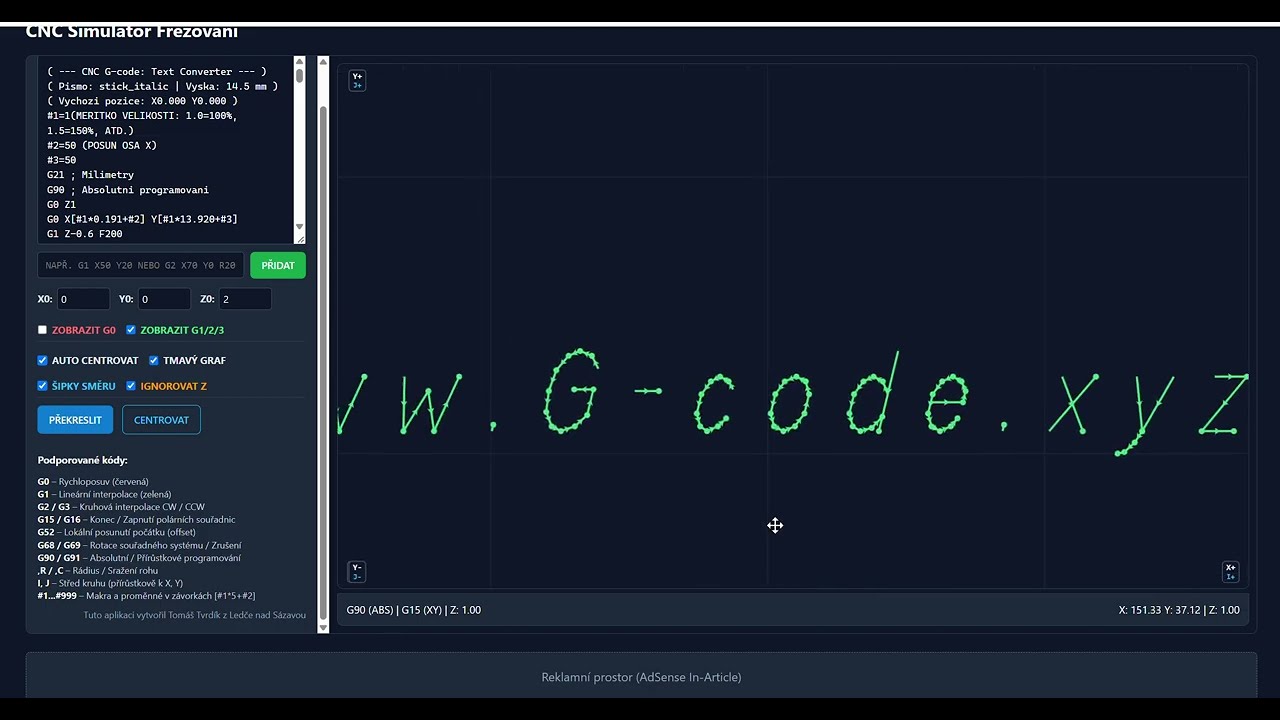
Detailed technical documentation: CNC Text-to-G-code Converter & Parametric Macros (Fanuc Custom Macro B)
This tool quickly and accurately generates NC code for engraving, marking and labeling parts on CNC mills and lathes with live tooling. In real time, the application breaks letters down into single-stroke vectors (stick fonts), applies spatial transformations and generates clean ISO/Fanuc G-code. A key feature is the optional parameterization with Fanuc Custom Macro B variables (#), which lets you change the size and position of the text directly on the machine control panel without touching the CAM system, fully replacing the problematic command G52.
1. Interface controls, fonts and geometry
The input field supports any text, including the full set of Czech characters (č, ď, ě, ň, ř, š, ť, ž, á, é, í, ó, ú, ů, ý including capitals). The backend automatically breaks carons, acute accents and rings into precise strokes positioned at the correct coordinates above the base letter.
Single-stroke fonts (stick fonts): The tool cuts a single thin line (along the path centerline), ideal for engraving cutters and V-bits. Available styles: Arial Sans, Technical DIN 3098 (ISO), Geometric rounded, Italic a Narrow label.
Custom TTF/OTF: Lets you load any font file from your computer and mill the outer outlines of the letters.
Sets the physical capital-letter height in millimeters (e.g. 12 mm). Character widths, letter spacing and accent proportions are recalculated automatically in the correct typographic ratio.
Define the start point in the plane where the bottom-left corner of the first letter will be placed relative to the active work offset (G54).
Draws an orange part outline in the preview so you can visually check that the text is centered. Supports Rectangular stock (X/Y rectangle) i Round stock (cylinder face / diameter D).
Lets you rotate the entire text by 0°, 90°, 180° or 270° and optionally flip the X or Y axis (for mirrored engraving into molds or labeling from the underside of the material).
2. G codes used in the generated program
| Command | Meaning | Technical role in the program |
|---|---|---|
| G21 | Metric unit system | Sets the machine control to millimeter data input. |
| G90 | Absolute programming | All positions are relative to the part origin. |
| G0 / G00 | Rapid traverse (traverses) | Used to retract safely from the material to the level Z{z_safe} and traverses to the start of the next letter stroke without touching the material. |
| G1 / G01 | Linear cutting feed | Plunges to the cutting depth Z{z_depth} posuvem F{feed_z} and then engraves the individual text strokes at feed rate F{feed_xy}. |
| M30 | End of program | Ends NC program execution and rewinds the cursor to the first line. |
3. How Custom Macro B variables work and why they fully replace G52
One of the greatest advantages of this generator is the option to enable Fanuc parametric macro variables (#). Instead of fixed numbers, coordinates are expressed as mathematical formulas in square brackets:
#2 = 50.000 (X-AXIS OFFSET)
#3 = 20.000 (Y-AXIS OFFSET)
...
G1 X[#1*6.800+#2] Y[#1*10.000+#3] F600
Why is this macro approach much better and safer than the G52 command?
- Risks of the G52 command (local coordinate shift):
- Command
G52 X... Y...shifts the machine's entire coordinate system. If the operator interrupts the cycle with RESET, or a crash occurs mid-program, on many older Fanuc versions the shift remains active and not reset! - The next tool then approaches the workpiece with an unwanted offset, causing a severe collision with the material or the vise.
- On some machines the command
G52 X0 Y0unintentionally clears or alters the global G54 work offset.
- Command
- Advantages of parametric programming without G52:
- Complete safety: The G54 work offset in the machine control stays untouched. All shifts are calculated purely mathematically inside the coordinates. A program reset leaves no hidden offset in the control.
- Position change directly on the machine: Need to move the text 30 mm to the right? No need to go back to the computer: the operator simply edits the program header on the Fanuc screen, changing
#2 = 80.0and the entire text is immediately milled at the new position. - Smooth size change: By changing a single variable
#1 = 0.8scales the text down to 80% of its original size without distorting the character shapes. - Repeated engraving in a loop (subprogram): The program can be placed in a subprogram (e.g.
O9100) and called from the main program in a loop with variable offsets, making it easy to number a series of parts on a pallet.
4. Custom line templates
The fields below let you adapt the generated code format for any control (Haas, Heidenhain, Sinumerik, LinuxCNC) using dynamic placeholders:
{x}a{y}– Current target coordinate (or macro formula) for the move.{z_safe}– Safe tool retract level between strokes.{z_depth}– Engraving cutter working depth in the material.{feed_xy}a{feed_z}– Feed rates in the plane and when plunging.
Z-0.1 až Z-0.3 mm produces clean, sharp lettering without burrs.