3D CNC Milling Simulator
VERTEX MILLING ENGINE - v10.4
Rectangular Stock Settings:
Tool Library (All Milling Tools)
| Tool | Typ | Parametry |
|---|---|---|
| Face / Roughing |
Radius (R)
Length
|
|
| End Mill |
Radius (R)
Length
|
|
| Drill / Shank |
Radius (R)
Length
|
X: 0.000
Y: 0.000
Z: 0.000
Real-Time 3-Axis 3D Milling Simulation
This advanced real-time simulation module removes material from a 3D solid stock model based on the entered G-code. It provides collision checking and visualization of rapid moves (G0) and cutting moves (G1, G2, G3), including tool offsets and tool definitions.
3D CNC Milling Simulator (Fanuc Control)
Click the preview to play a video demonstration of the 3D simulator.
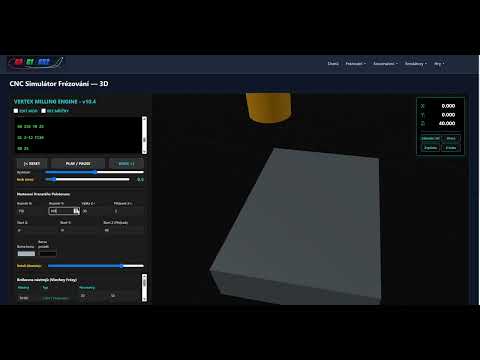
Detailed guide to the 3D CNC milling simulator (Vertex Milling Engine)
This simulation module is a complete 3D environment for verifying milling programs written in Fanuc syntax. Unlike ordinary viewers that only draw lines, this engine performs real-time volumetric material removal from the 3D stock, checks spindle collisions and lets you verify complex toolpaths, including ramping, helices, bolt-hole circles and Fanuc macros.
Supported G-codes and Fanuc Syntax
| Code / Format | Funkce | Behavior in the 3D simulator |
|---|---|---|
| G0 / G00 | Rychloposuv | Non-cutting traverse. If the tool hits material in this mode, it turns red as a collision warning. |
| G1 / G01 | 3D linear interpolation | Linear material removal at feed rate. Supports simultaneous X, Y and Z motion (ramps, gradual plunging to depth). The tool glows green while cutting. |
| G2 / G3 | Circular and helical interpolation | CW (G2) and CCW (G3) arcs defined by radius R or center vectors I, J. With simultaneous Z-axis motion it creates a smooth helix; with a varying radius it calculates a spiral. |
| G15 / G16 | Polar coordinates | G16 switches input to polar coordinates (X address = bolt-circle radius, Y = angle in degrees). Ideal for drilling flanges and holes on a bolt circle. G15 cancels polar mode. |
| G52 | Local origin shift | Temporary work coordinate shift (e.g. moving the center for a series of polar holes). |
| G68 / G69 | Spatial coordinate rotation | G68 X... Y... R... rotates the following contours around the center by angle R. G69 cancels the rotation. |
| G90 / G91 | Absolute / Incremental | Switches between programming from the origin (G90) and incremental input (G91). |
| ,R a ,C | Direct corner rounding and chamfering | Fanuc syntax directly after a G1 block: ,R inserts a tangential blend radius, ,C creates a corner chamfer. |
| T (e.g. T0101) | Tool library and tool change | Loads a tool from the table. The simulator immediately updates the diameter and length of the 3D cutter model in the spindle and adjusts the width of the cut. |
| #1 to #999 | Parametric programming | Full support for macros, variables and mathematical expressions: SIN, COS, TAN, SQRT, ABS, ROUND, FIX, FUP and brackets [...]. |
3D environment features and controls
- Realistic material removal (vertex shading): The simulator deforms the height map of the 3D stock model in real time according to the cutting-edge geometry. Milled pockets, slots, chamfers and hole depths are visible on the workpiece.
- Color indication of cutting-edge contact: The tool in the spindle changes color according to its state: orange when moving through air, green when cutting correctly at feed rate, and red on a collision during rapid traverse (G0).
- Animation control and step (XYZ step): Buttons PLAY / PAUSE, RESET and block-by-block stepping KROK >|. The slider Step (mm) adjusts the spatial subdivision of the path from a coarse preview down to fine rounding (0.1 mm).
- Instant jump in the program: Click any line in the editor and the simulator instantly removes material up to the selected block and places the tool in the resulting position.
- Digital position readout (DRO): The top-right corner of the screen shows the exact tool tip coordinates in X, Y and Z in real time.
- Preset camera views: With a single click you can switch the view to Default 3D (axonometric), Zhora (XY plane), Front (XZ plane) or Side (YZ plane).
- Stock and display settings: Full freedom to set the stock dimensions (X, Y, Z-, Z+ facing allowance), starting clearance planes, material color and calculation mesh density.
Practical warning: The simulator is intended for training and for verifying 3D toolpaths. Before running a program on a real machining center, always check safe Z clearance planes and tool stick-out relative to clamps and the vise.